This case study is due for a visual update.
Simplified Meal-Logging for Diabetes Patients
Simplified Meal-Logging for Diabetes Patients
77 million people in India have type-2 diabetes. Another 80 million are pre-diabetic. Sugar.fit (acquired by Cult.fit) is a mobile app that helps these patients manage their diabetes. The app acts as a single platform for doctor consultations, 1-on-1 live diabetes coaching, and activity logging to track sugar levels.
I worked with Sugar.fit’s Head of Design on improving the adoption of the app’s logging feature.
77 million people in India have type-2 diabetes. Another 80 million are pre-diabetic. Sugar.fit (acquired by Cult.fit) is a mobile app that helps these patients manage their diabetes. The app acts as a single platform for doctor consultations, 1-on-1 live diabetes coaching, and activity logging to track sugar levels.
I worked with Sugar.fit’s Head of Design on improving the adoption of the app’s logging feature.
MY RESPONSIBILITIES
Interaction Design, Prototyping, Usability Optimization
PLATFORM
Mobile Application
TIMELINE
Nov - Jan 2021
VISIT THE MARKETING SITE
IN A HURRY ?
THE PROBLEM
Not many users actually logging their daily meals
Not many users actually logging their daily meals
Sugar.fit, launched in July 2021, had an aim to manage diabetes by reducing medicine dependency and relying on personalized programs. Each user started a 12-month program, receiving a dedicated doctor and diabetes coach. A phlebotomist would then set up a Continuous Glucose Monitor (CGM) and take blood samples to establish a baseline. The CGM then automatically and securely relayed real-time sugar levels to the doctor and coach, allowing them to suggest diet plans based on each user’s specific glycemic response.
However, a typical CGM would last for only 15 days, after which users would have to pay an extra amount to have another one set up. Most users would choose to not buy another CGM. Enter Sugar.fit’s manual meal logging feature:
Sugar.fit, launched in July 2021, had an aim to manage diabetes by reducing medicine dependency and relying on personalized programs. Each user started a 12-month program, receiving a dedicated doctor and diabetes coach. A phlebotomist would then set up a Continuous Glucose Monitor (CGM) and take blood samples to establish a baseline. The CGM then automatically and securely relayed real-time sugar levels to the doctor and coach, allowing them to suggest diet plans based on each user’s specific glycemic response.
However, a typical CGM would last for only 15 days, after which users would have to pay an extra amount to have another one set up. Most users would choose to not buy another CGM. Enter Sugar.fit’s manual meal logging feature:
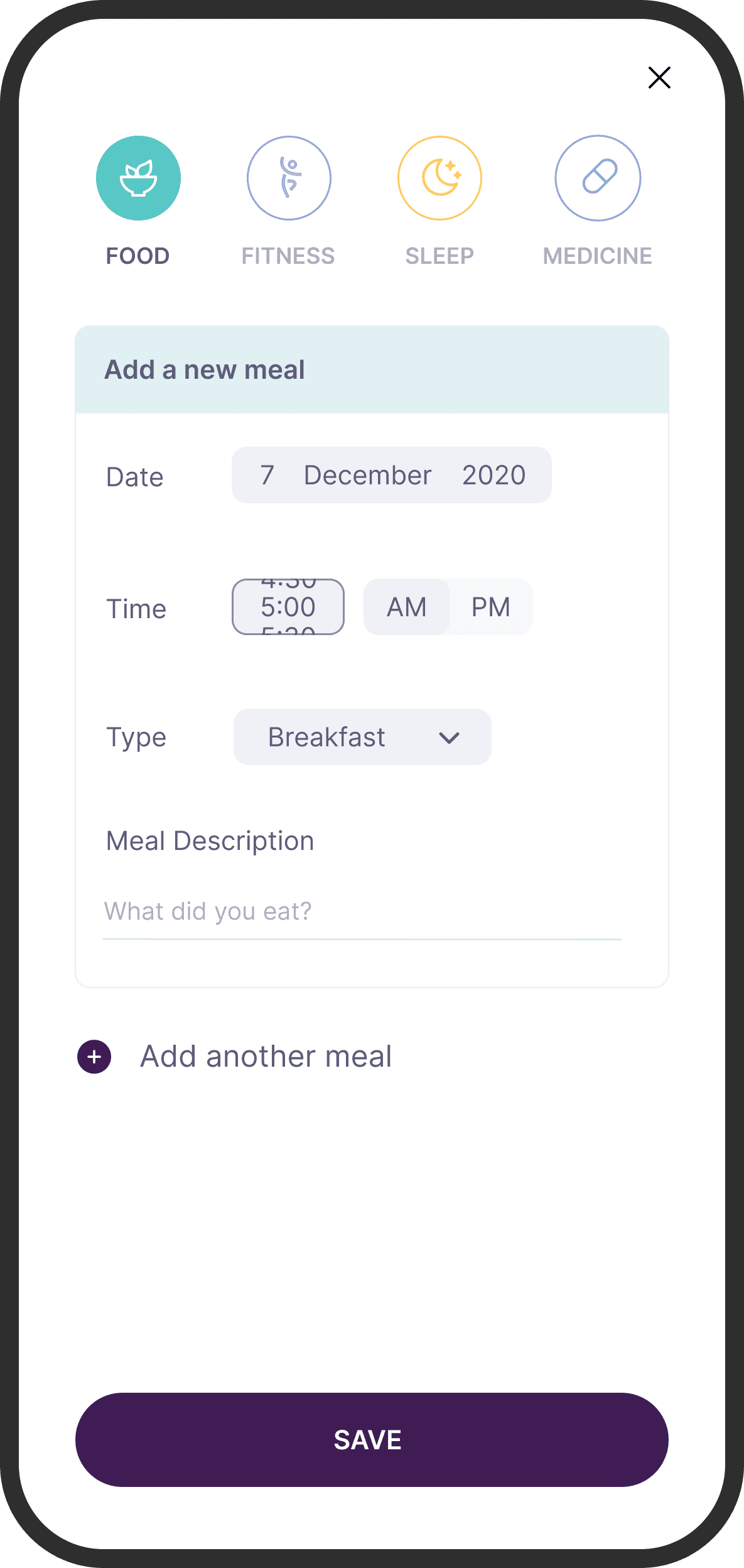
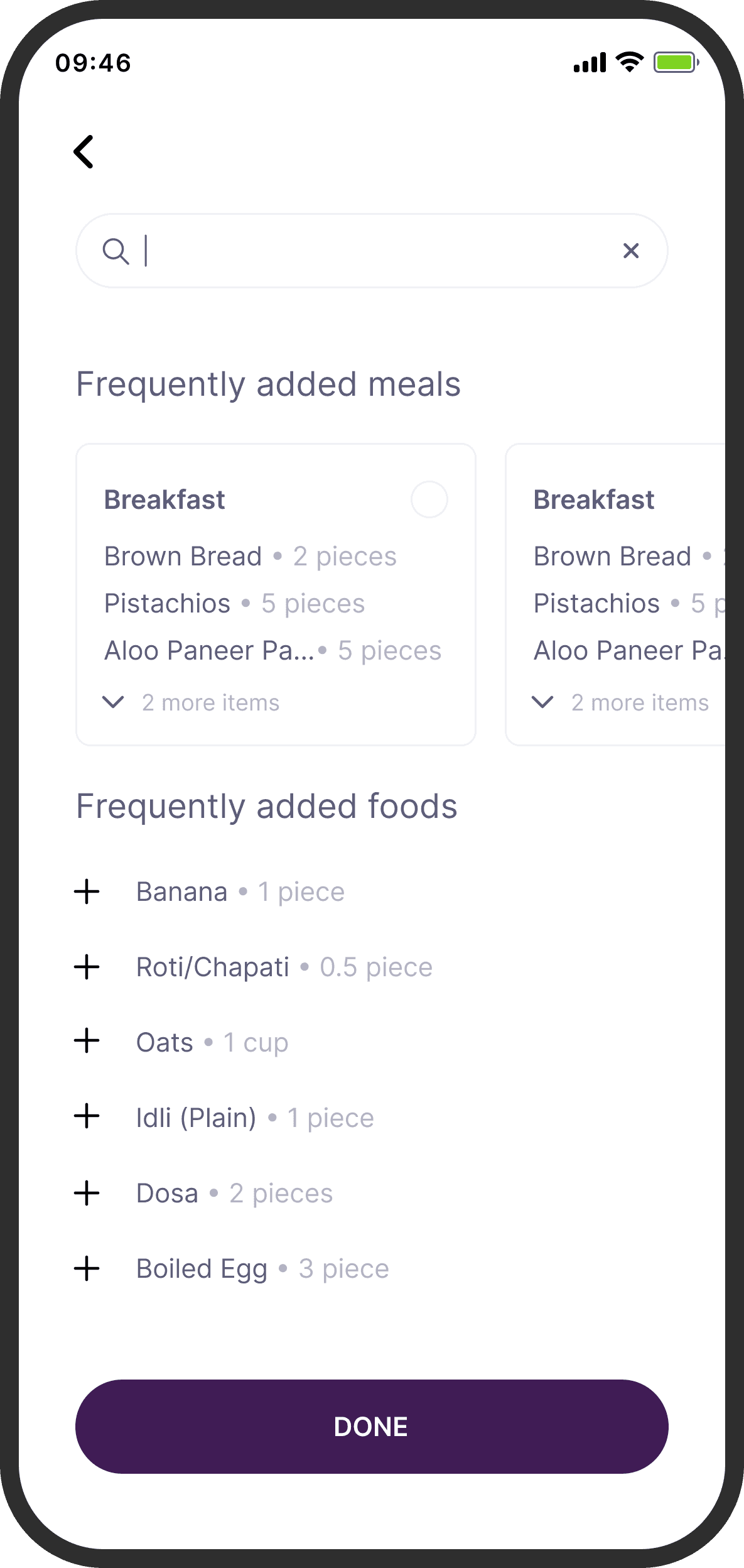
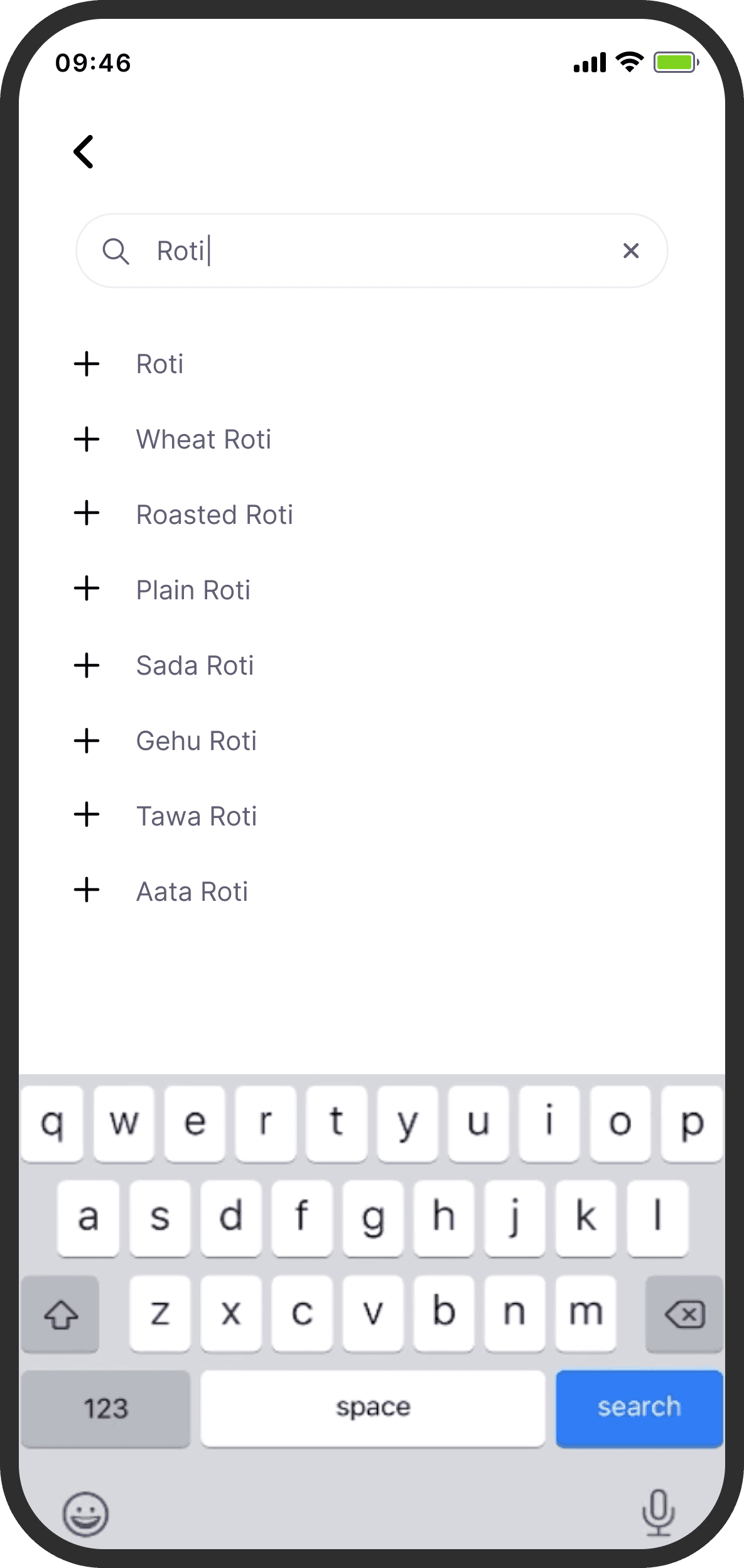
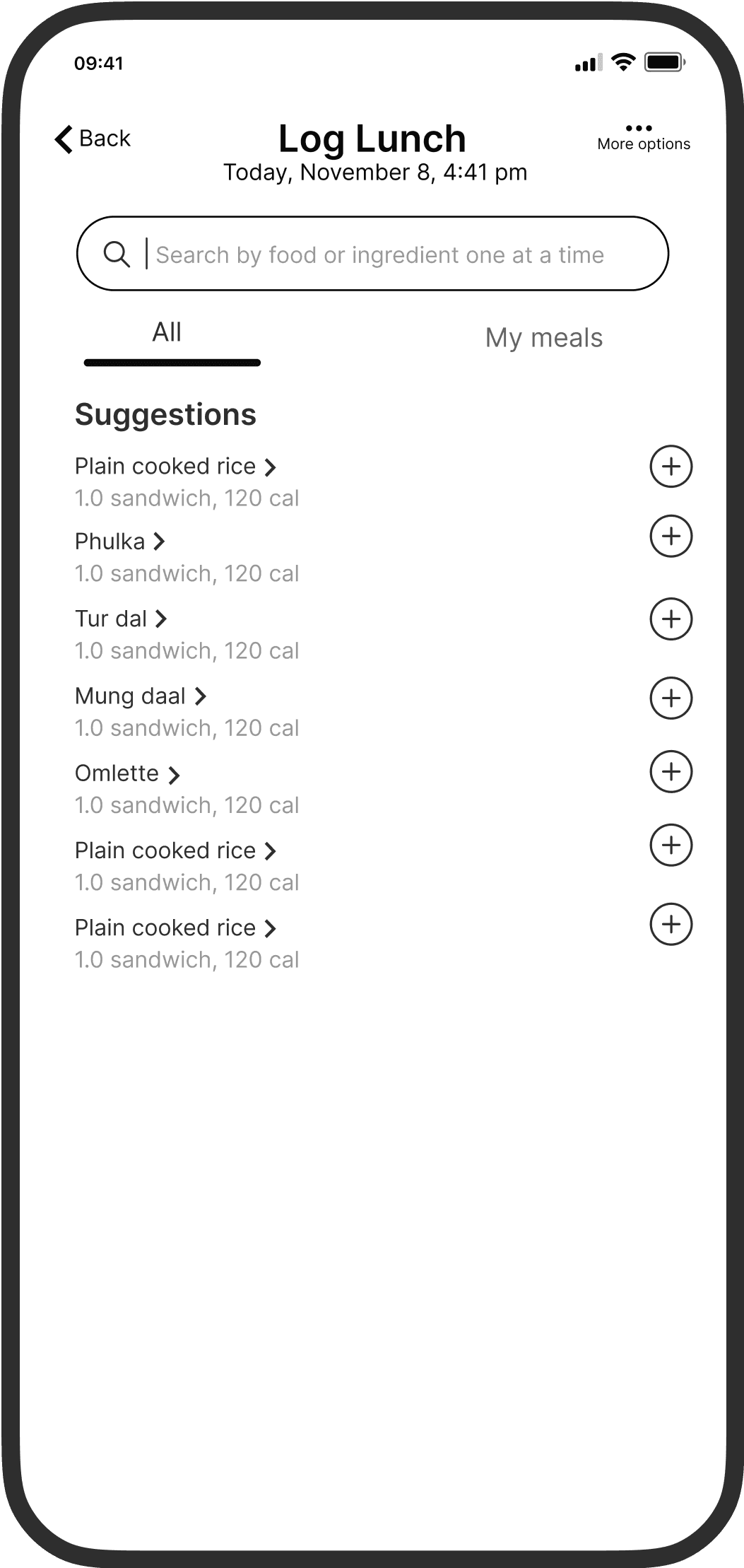
This flow enabled users to manually log information about their daily caloric intake after the initial CGM period was over. But, only a very small % of users logged their daily meals.
Logging daily meals (along with their daily blood sugar readings) was important as it provided the doctor and coach with useful data that helped gauge the efficacy of their customized diet plans and adjust accordingly. Logging each meal also helped keep users accountable in some way.
This flow enabled users to manually log information about their daily caloric intake after the initial CGM period was over. But, only a very small % of users logged their daily meals.
Logging daily meals (along with their daily blood sugar readings) was important as it provided the doctor and coach with useful data that helped gauge the efficacy of their customized diet plans and adjust accordingly. Logging each meal also helped keep users accountable in some way.
PRIORITIZATION
Focussing on usability first
Focussing on usability first
Fortunately, Sugar.fit had done some internal research on why this could be happening. It found that:
90% of Sugar.fit’s support tickets highlighted that the food logging flow was not easy to use.
Some users just did not see the value in manually logging their food daily. A few even sent their photos of their food to their doctors, rather than manually logging it.
Sugar.fit decided to tackle the second, higher leverage problem of logging later in its roadmap. In the meantime, we decided to go after improving usability, hoping to have a quick win with an uptick in adoption of this logging feature. Many users also ended up logging their daily meals after being convinced by their doctors, so streamlining the logging experience to reduce any friction started to look even better.
Fortunately, Sugar.fit had done some internal research on why this could be happening. It found that:
90% of Sugar.fit’s support tickets highlighted that the food logging flow was not easy to use.
Some users just did not see the value in manually logging their food daily. A few even sent their photos of their food to their doctors, rather than manually logging it.
Sugar.fit decided to tackle the second, higher leverage problem of logging later in its roadmap. In the meantime, we decided to go after improving usability, hoping to have a quick win with an uptick in adoption of this logging feature. Many users also ended up logging their daily meals after being convinced by their doctors, so streamlining the logging experience to reduce any friction started to look even better.
DEFINING THE PROBLEM
A simple, time-bounded goal
A simple, time-bounded goal
Users’ main goal with Sugar.fit was to get healthier by reducing their average blood sugar levels over time. Expecting these users to meticulously record every meal every day was already a challenging demand. Compounded by usability issues, their task became significantly more taxing.
Our goal was straightforward: to increase the percentage of daily meals logged. We weren't striving for 100% adoption, but rather to see some improvement in logging. Optimizing usability was already validated to some extent and had a high impact to effort ratio, especially considering our 3-week timeline.
Users’ main goal with Sugar.fit was to get healthier by reducing their average blood sugar levels over time. Expecting these users to meticulously record every meal every day was already a challenging demand. Compounded by usability issues, their task became significantly more taxing.
Our goal was straightforward: to increase the percentage of daily meals logged. We weren't striving for 100% adoption, but rather to see some improvement in logging. Optimizing usability was already validated to some extent and had a high impact to effort ratio, especially considering our 3-week timeline.
SOLUTION
A smoother logging experience
Immersing myself in the problem space
I did a quick usability audit to identify points of friction throughout the food logging flow. This was done with our target users in mind, primarily individuals above 50, and taking into account multiple user paths, not just the ideal one. I also referenced a few usability heuristics and accounted for vision-based accessibility guidelines.
Given that the majority of the pain-points were at an interaction-level and involved making changes to the information architecture, I worked in low to mid-fidelity to ideate and get feedback faster. Also, the visual language for the app was pretty well defined, but when required, I suggested visual design changes that helped reinforce usability.
These were some of the problems I identified and the solutions I suggested for each:
I did a quick usability audit to identify points of friction throughout the food logging flow. This was done with our target users in mind, primarily individuals above 50, and taking into account multiple user paths, not just the ideal one. I also referenced a few usability heuristics and accounted for vision-based accessibility guidelines.
Given that the majority of the pain-points were at an interaction-level and involved making changes to the information architecture, I worked in low to mid-fidelity to ideate and get feedback faster. Also, the visual language for the app was pretty well defined, but when required, I suggested visual design changes that helped reinforce usability.
These were some of the problems I identified and the solutions I suggested for each:
1 OF 3
Problem
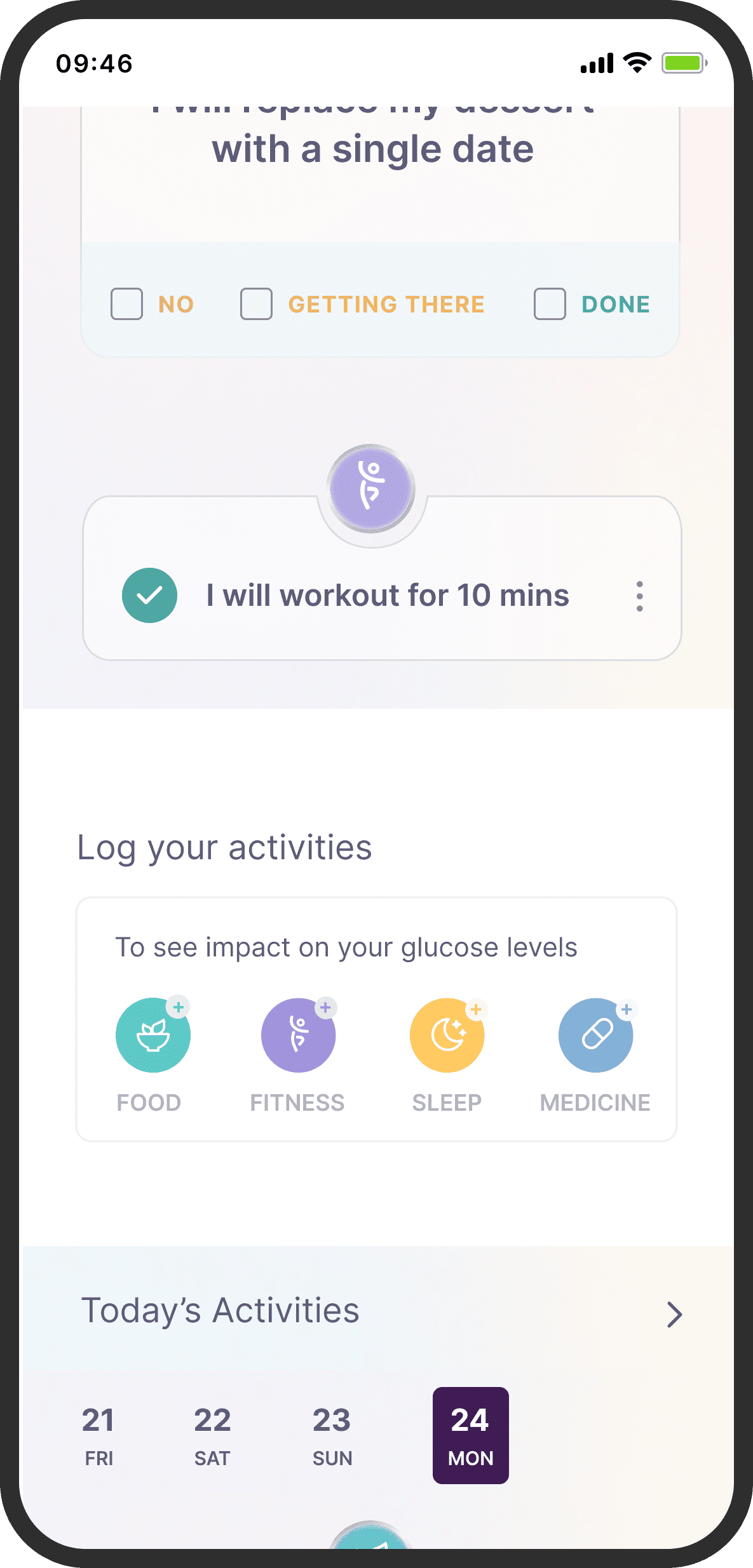
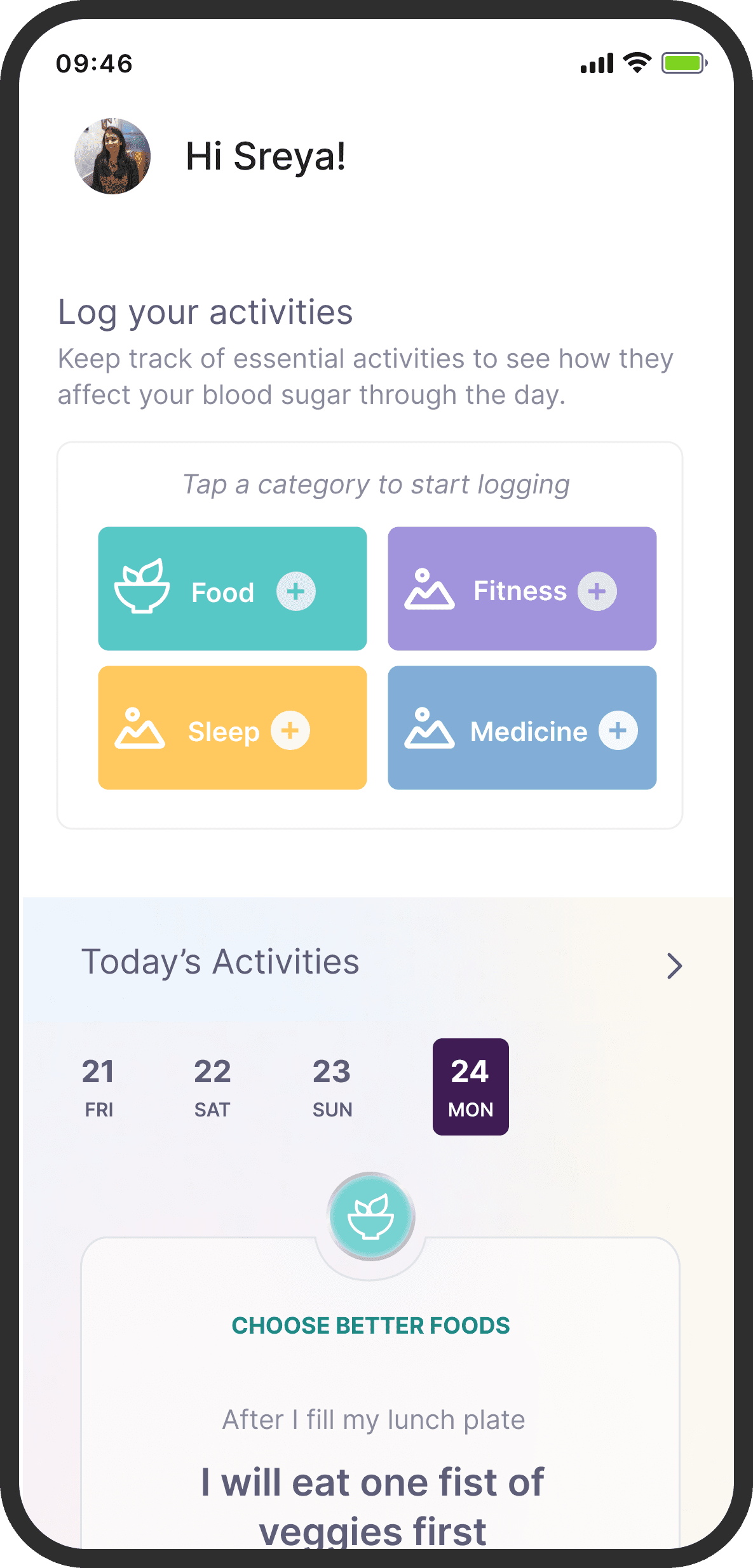
For new users logging their food, there was a lack of clarity on why they should log their data.
The tap targets also seemed small with relatively poor readability for the labels. The smaller tap targets could also lead to selection errors.
For new users logging their food, there was a lack of clarity on why they should log their data.
The tap targets also seemed small with relatively poor readability for the labels. The smaller tap targets could also lead to selection errors.
Suggested Solution
Accounting for the frequency of use and the importance of the feature, I placed it at the very top of the screen to improve its visibility.
I increased the size of the buttons and made the labels easier to read. At the top, to set better context, I added a line to add more details on what new users can expect from using the feature.
Accounting for the frequency of use and the importance of the feature, I placed it at the very top of the screen to improve its visibility.
I increased the size of the buttons and made the labels easier to read. At the top, to set better context, I added a line to add more details on what new users can expect from using the feature.
2 OF 3
Problem
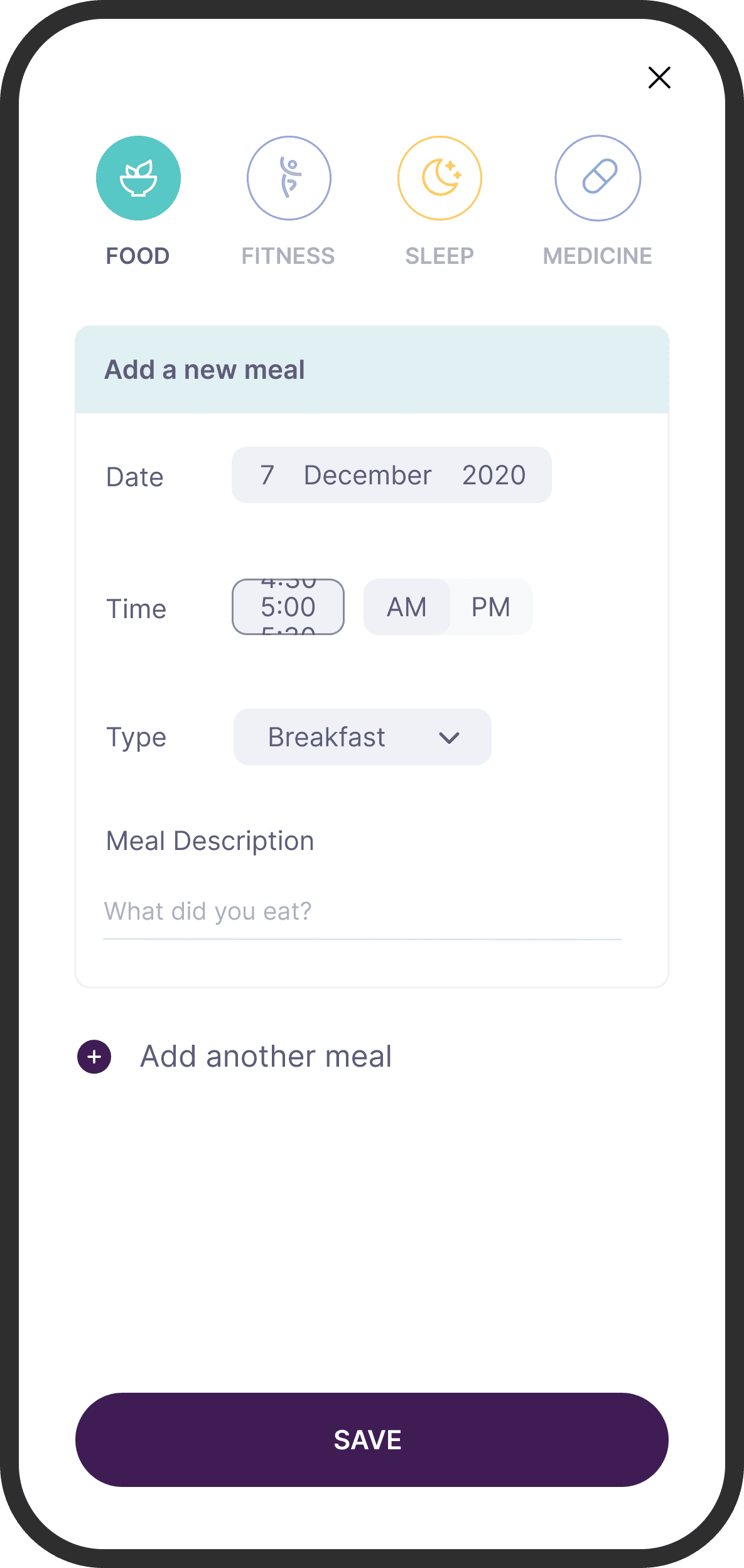
The start of the food logging screen had smaller buttons again. The main action (“What did you eat ?”) did not have a clear enough signifier either.
The start of the food logging screen had smaller buttons again. The main action (“What did you eat ?”) did not have a clear enough signifier either.
Suggested Solution
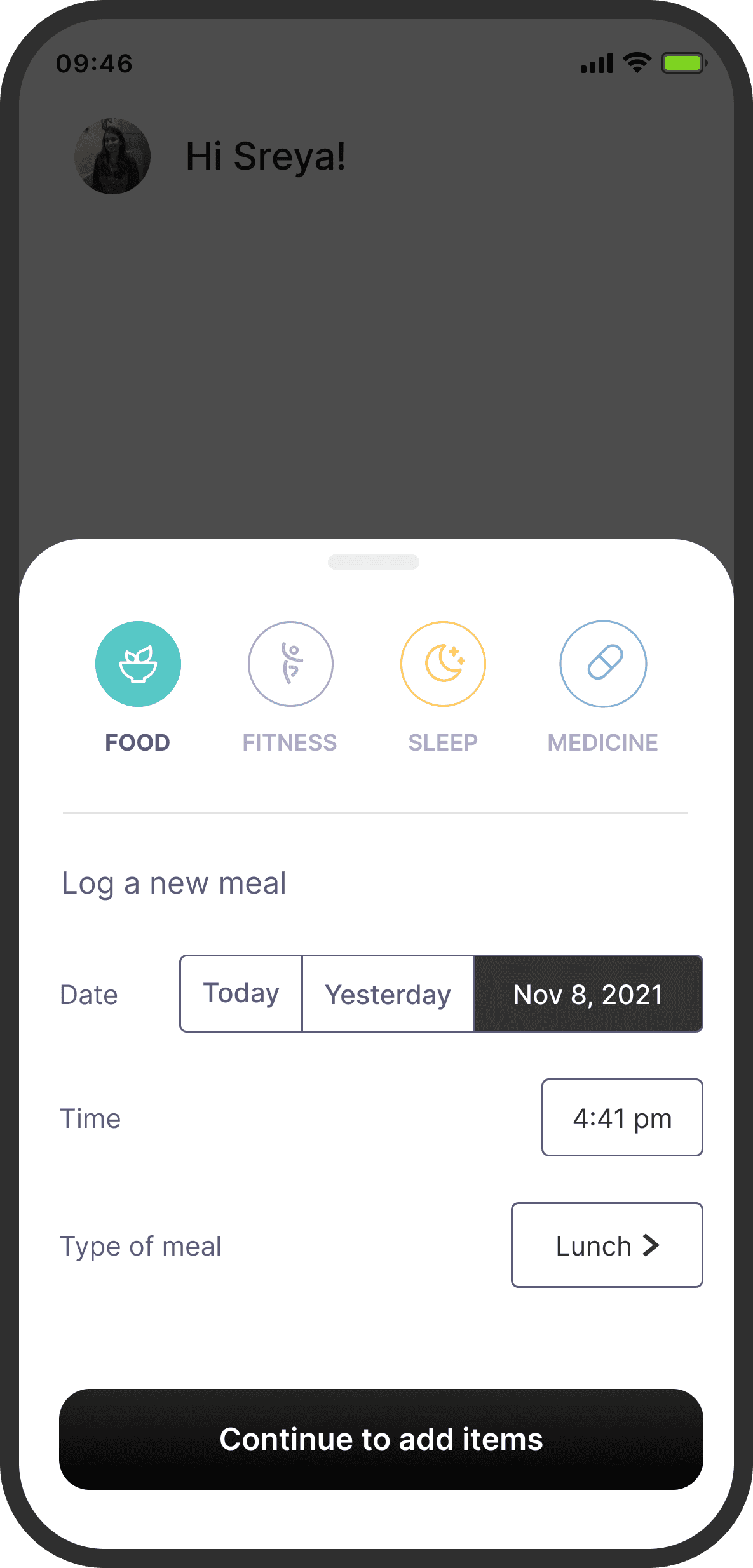
Since this was a feature that was supposed to be used a lot, I decided to use a bottomsheet. A bottomsheet, overlayed on top of the screen where users triggered the flow, felt faster than taking the user to a separate screen.
Apart from increasing the size of the buttons and making actions clearer, I used segmented buttons for the Date field. Looking at past user research, I found that a lot of users would either log the same day’s or the previous day’s meals. Using a segmented button rather than a dropdown date input control, would save a few redundant taps and make the experience feel faster.
Since this was a feature that was supposed to be used a lot, I decided to use a bottomsheet. A bottomsheet, overlayed on top of the screen where users triggered the flow, felt faster than taking the user to a separate screen.
Apart from increasing the size of the buttons and making actions clearer, I used segmented buttons for the Date field. Looking at past user research, I found that a lot of users would either log the same day’s or the previous day’s meals. Using a segmented button rather than a dropdown date input control, would save a few redundant taps and make the experience feel faster.
3 OF 3
Problem
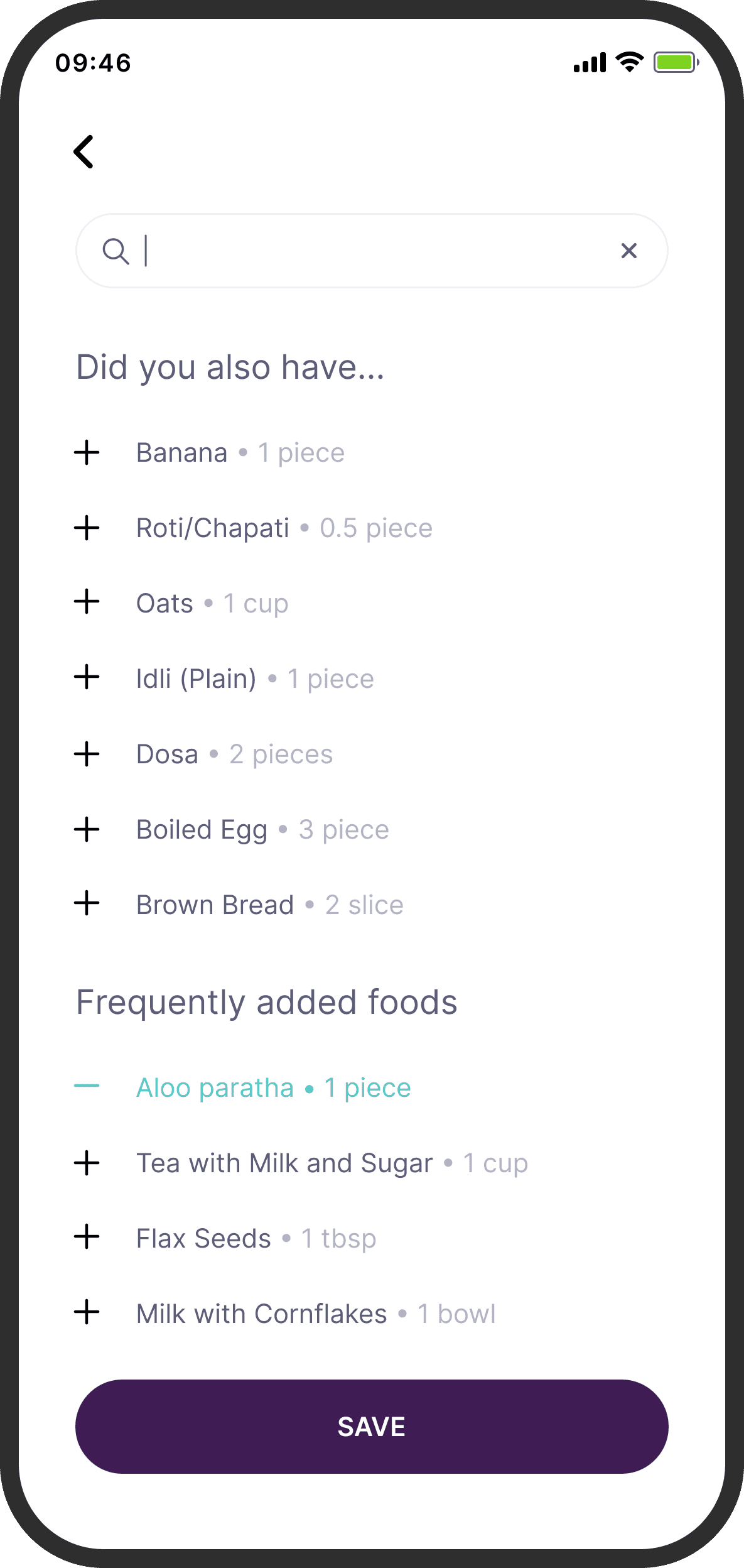
The actual logging was a little cumbersome. There was no easy way to keep track of what has been logged before, unless a user taps on save and goes back to the earlier screen.
The actual logging was a little cumbersome. There was no easy way to keep track of what has been logged before, unless a user taps on save and goes back to the earlier screen.
Suggested Solution
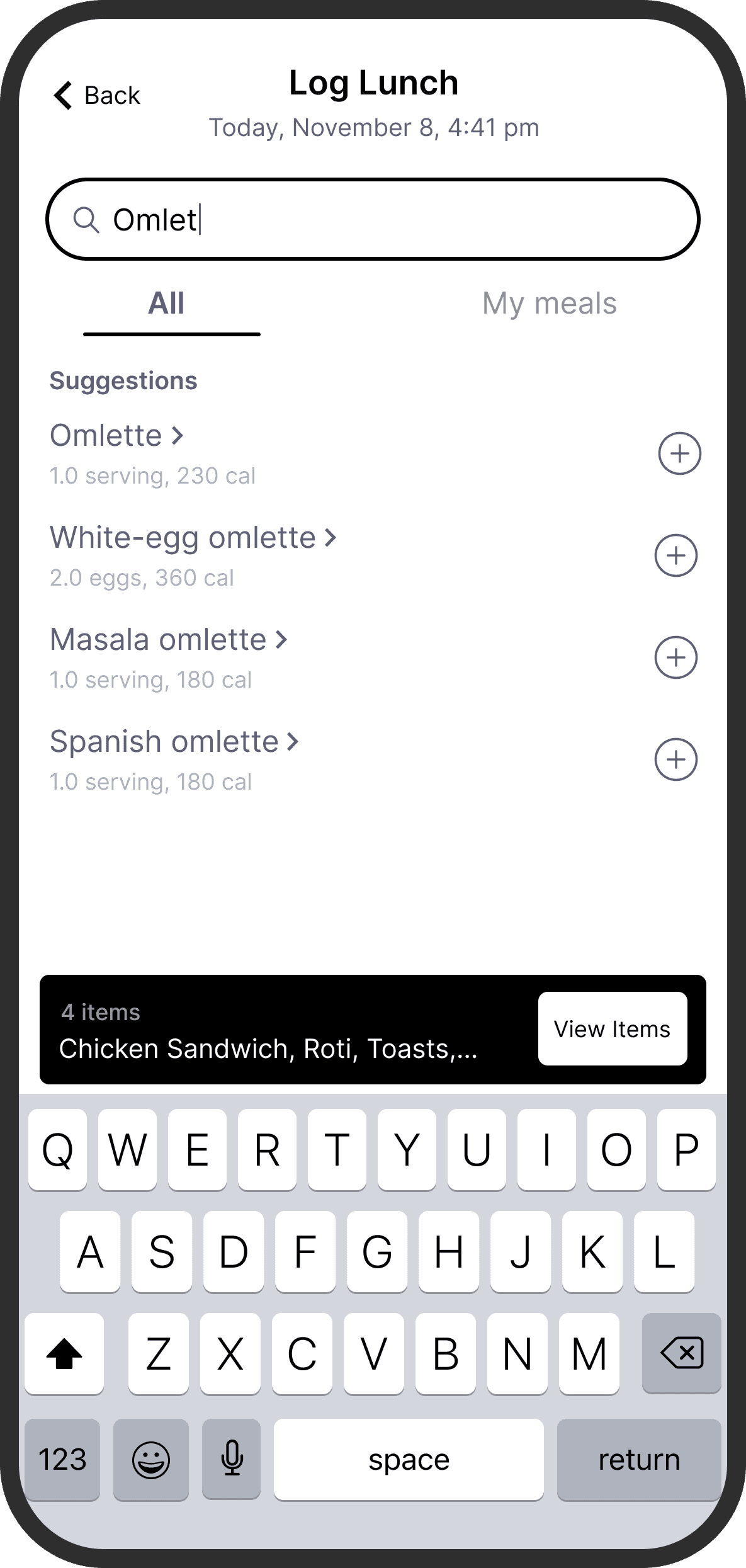
To promote recall and reduce going back and forth, I added a persistent basket that would show items that were logged in the same flow. I got this idea from food delivery apps. To preserve context, I also retained the date and time of logging, which the user would have selected in the previous screen.
One aspect of the interface I considered and wanted to test, was whether “View Items” signified the main action once a user was done adding items.
To promote recall and reduce going back and forth, I added a persistent basket that would show items that were logged in the same flow. I got this idea from food delivery apps. To preserve context, I also retained the date and time of logging, which the user would have selected in the previous screen.
One aspect of the interface I considered and wanted to test, was whether “View Items” signified the main action once a user was done adding items.
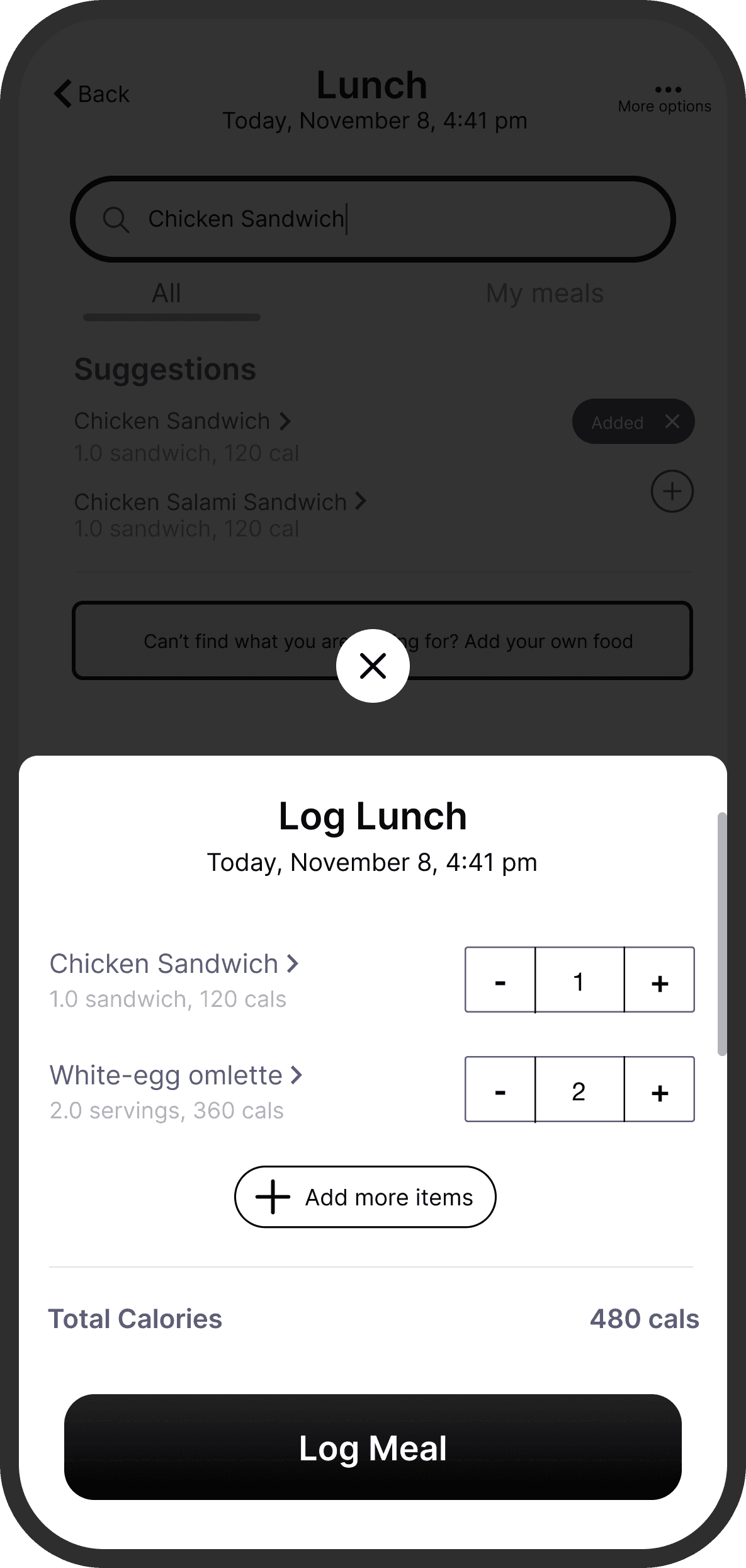
To extend the “basket” concept, I designed a bottomsheet that summarized the added items and showed the total calories. The old flow felt like a one-way relationship between the user and their data. Showing total calories was one way users could get some value out of logging.
To extend the “basket” concept, I designed a bottomsheet that summarized the added items and showed the total calories. The old flow felt like a one-way relationship between the user and their data. Showing total calories was one way users could get some value out of logging.
RESULTS + REFLECTIONS
Improved experience and logging numbers
Improved experience and logging numbers
After I handed over the prototype and wireframes, Sreya (Head of Design), readied the screens for production by applying Sugar.fit’s visual language and guidelines. A few months after the optimized food logging feature was launched, I reached out to Sreya to find out whether the re-design had any impact:
After I handed over the prototype and wireframes, Sreya (Head of Design), readied the screens for production by applying Sugar.fit’s visual language and guidelines. A few months after the optimized food logging feature was launched, I reached out to Sreya to find out whether the re-design had any impact:
Percentage of daily food loggings was up, although by a small amount. And, during user interviews conducted after the launch, users reported a “much easier” experience of logging their food.
What could I have done differently ?
I would have asked for another week to spend some time doing exploratory user research and a couple usability tests with the old flow before I began my own usability audit. That would have uncovered a lot more pain-points and even helped us prioritize existing ones, ironically increasing our speed to meet the timeline much faster.
I would have asked for another week to spend some time doing exploratory user research and a couple usability tests with the old flow before I began my own usability audit. That would have uncovered a lot more pain-points and even helped us prioritize existing ones, ironically increasing our speed to meet the timeline much faster.
Credits
Credits
The team that worked with me on this project
Head of Design at Sugar.fit
Head of Design at Sugar.fit
Sreya ahuja
Sreya ahuja
Project Manager at Sugar.fit
Project Manager at Sugar.fit
SHIVTOSH KUMAR
SHIVTOSH KUMAR
Project Manager at Lights Out
Project Manager at Lights Out
ANUDEEP BORUSU
ANUDEEP BORUSU
This case study is due for a visual update.